Khatt (خَطّ)



Correct Arabic text for Python: on images, in videos and in the terminal. Joined letters, right-to-left order and vowel marks in place, the same on Windows, macOS and Linux, with no system libraries.
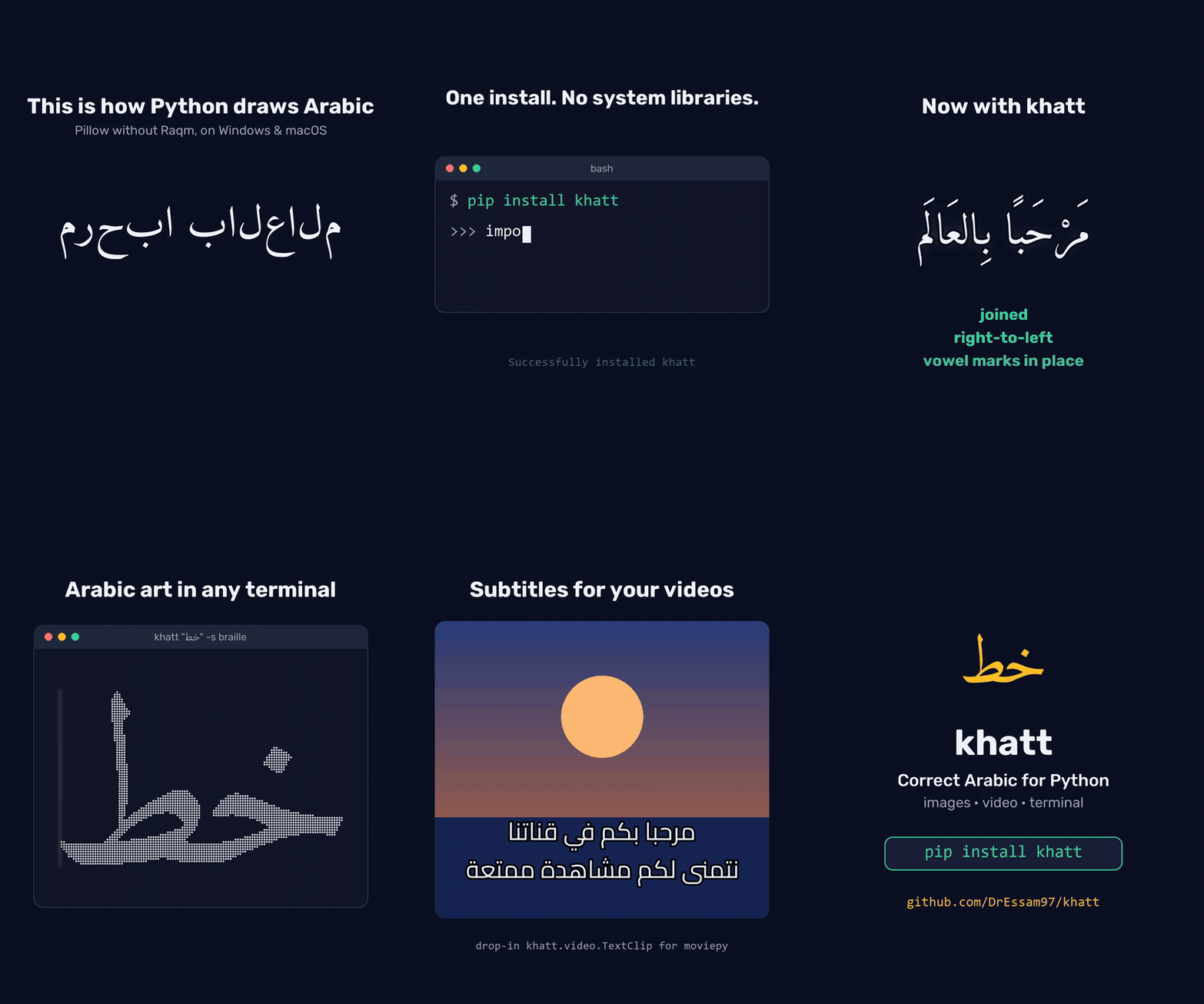
Try it without installing anything:
uvx khatt "مرحبا"
Or install it with pip install khatt. The
documentation has this guide and the full API
reference.
Used by
MoneyPrinterTurbo for Arabic subtitles in the videos it generates
supervision for Arabic labels in
RichLabelAnnotator(optionalrtlextra)RapidOCR for Arabic text in its result images (optional
rtlextra)ComfyUI LayerStyle for Arabic in its Simple Text Image node
manga-image-translator for Arabic in the translations it draws onto manga pages
memegen for Arabic memes with
font=aragnes-video-generator for Arabic subtitles in the videos it puts together
Features
Draw on images.
khatt.draw_textis a drop-in for Pillow’sImageDraw.text, with wrapping, alignment, outlines and translucent fills.khatt.overlayfits text into a box andkhatt.text_bboxmeasures it.Coloured words.
spanscolours part of the text, such as the word being spoken in a caption, without breaking a single join.digits="arabic-indic"writes the numbers as ١٢٣.OpenCV, Tkinter and receipts.
khatt.put_textdraws onto NumPy frames likecv2.putText, the same on every OpenCV version,khatt.tk_imageputs Arabic in Tkinter labels and buttons, andkhatt.receipt_imagelays out receipts for thermal printers.OCR training data.
khatt.ocr_linesmakes Arabic line images whose labels and word boxes are exact, andkhatt --ocr-datasaves them as a dataset.Word art. Gold, neon, fire, 3D and more in one line with
khatt.word_art, or build your own from gradients, glows, shadows, depth and bevels.Calligrams.
khatt.calligramflows text inside a heart, a circle or any image of your own, with Arabic lines stretched by kashida.Justified text and poetry.
align="justify"fills paragraphs to the width with kashida, as books are printed, andkhatt.poemsets verses in two columns.Zakhrafa.
khatt.zakhrafadecorates names to copy and paste, without breaking a single join.SVG.
khatt.render_svggives the same text as vector outlines, for the web, design tools and cutting machines.Video captions.
khatt.video.TextClipis a drop-in for moviepy’sTextClip, andkhatt.video.word_captionslights up each word as it’s said, from Whisper’s word timings.Terminal art. Render Arabic as
blocks,ascii,braille,halfblocks,quadrants,sextantsorlettersart (a word drawn out of its own letters), the Arabic FIGlet, in colour with palettes and right-to-left gradients, and save it as PNG, SVG, HTML or ANSI text.khatt --fetchshows your machine’s details in Arabic beside a logo, like neofetch, and--animatetypes, wipes or stretches the art without breaking a single join.--frameputs it in a lawha frame and--canvas socialsizes it for a post.--arabizitakes Arabizi (7abibi) and writes it in Arabic letters first.Any font. Eight bundled OFL fonts in Naskh, Kufi, Ruqaa and display styles, 22 more with
pip install khatt-fonts, or your own.ttf/.otf, with fallback fonts for characters it has no glyph for.The same output everywhere. khatt shapes and draws text itself with HarfBuzz, so it doesn’t depend on Raqm, FriBiDi or any other system library, and it never shapes text twice.
khatt --doctorshows what your environment has, and finds code that still pre-shapes Arabic with arabic_reshaper.
Install
pip install khatt            # or: uv add khatt
pip install "khatt[video]"   # adds moviepy, for khatt.video captions
khatt supports Python 3.11 to 3.14 on Windows, macOS and Linux.
From source:
git clone https://github.com/DrEssam97/khatt.git && cd khatt
uv sync
Drawing on images
khatt.draw_text draws correctly shaped Arabic, mixed Arabic/Latin and Arabizi
onto an existing Pillow image. It’s a drop-in for ImageDraw.text, and
khatt.overlay fits text into a box:
from PIL import Image
import khatt

image = Image.open("certificate.png").convert("RGBA")

# Like ImageDraw.text: xy is where the anchor goes ("ra" = right edge, ascender line).
khatt.draw_text(image, (1100, 80), "شهادة تقدير", size_px=72, anchor="ra", fill="#1a3c6e")
khatt.draw_text(image, (1100, 200), "تُمنح هذه الشهادة إلى", size_px=36, anchor="ra",
                max_width=800)  # wraps at spaces

# The largest size at which the name fits the box, wrapped if it has to be.
khatt.overlay(image, "محمد عبد الله", (200, 260, 1100, 400), padding=12, fill="black")

image.save("certificate-filled.png")

# Outlined text, e.g. captions or thumbnails over busy backgrounds.
frame = Image.open("frame.png").convert("RGB")
khatt.draw_text(frame, (640, 650), "مرحبا بالعالم", size_px=64, anchor="md",
                fill="white", stroke_width=5, stroke_fill="black")

# Measure without drawing, like ImageDraw.textbbox: the exact box draw_text paints.
left, top, right, bottom = khatt.text_bbox("مرحبا بالعالم", xy=(640, 650), size_px=64,
                                           anchor="md", stroke_width=5)
Pass text as typed. Don’t run it through
arabic_reshaperorget_displayfirst.draw_text:size_px(pixels per em, likeImageFont.truetype),fill(colour name,#rrggbb[aa]or an RGB/RGBA tuple; alpha makes the text translucent), Pillow-styleanchor(l/m/r+a/t/m/s/b/d),max_widthin pixels to wrap,line_spacing(baseline distance in multiples of the size) orspacing(pixels between lines, as in Pillow’smultiline_text),align(None: right-to-left paragraphs right-aligned, left-to-right ones left-aligned),keep_tashkeel(diacritics are kept by default on images), andstroke_width/stroke_fillfor an outline, as in Pillow: it grows outward around the text without moving it, andstroke_filldefaults tofill.overlay(image, text, (left, top, right, bottom)):fit="shrink"(default) uses the largest size betweenmax_size_pxandmin_size_pxat which the wrapped text fits;"wrap"wraps atmax_size_px;"none"draws atmax_size_pxas is. Alsoalign,valign(top/middle/bottom),padding, and the samestroke_width/stroke_fill(the outline is fitted inside the padding too). It never draws outside the box: text that doesn’t fit is clipped, with akhatt.TextOverflowWarning.text_bbox(text, xy=(0, 0), ...)takesdraw_text’s arguments and returns(left, top, right, bottom): exactly the pixelsdraw_textwould paint, outline included. Use it to measure words for your own wrapping or to size a box behind a caption.RGB and RGBA images both work; on RGBA, a transparent background stays transparent around the text.
Colour part of the text
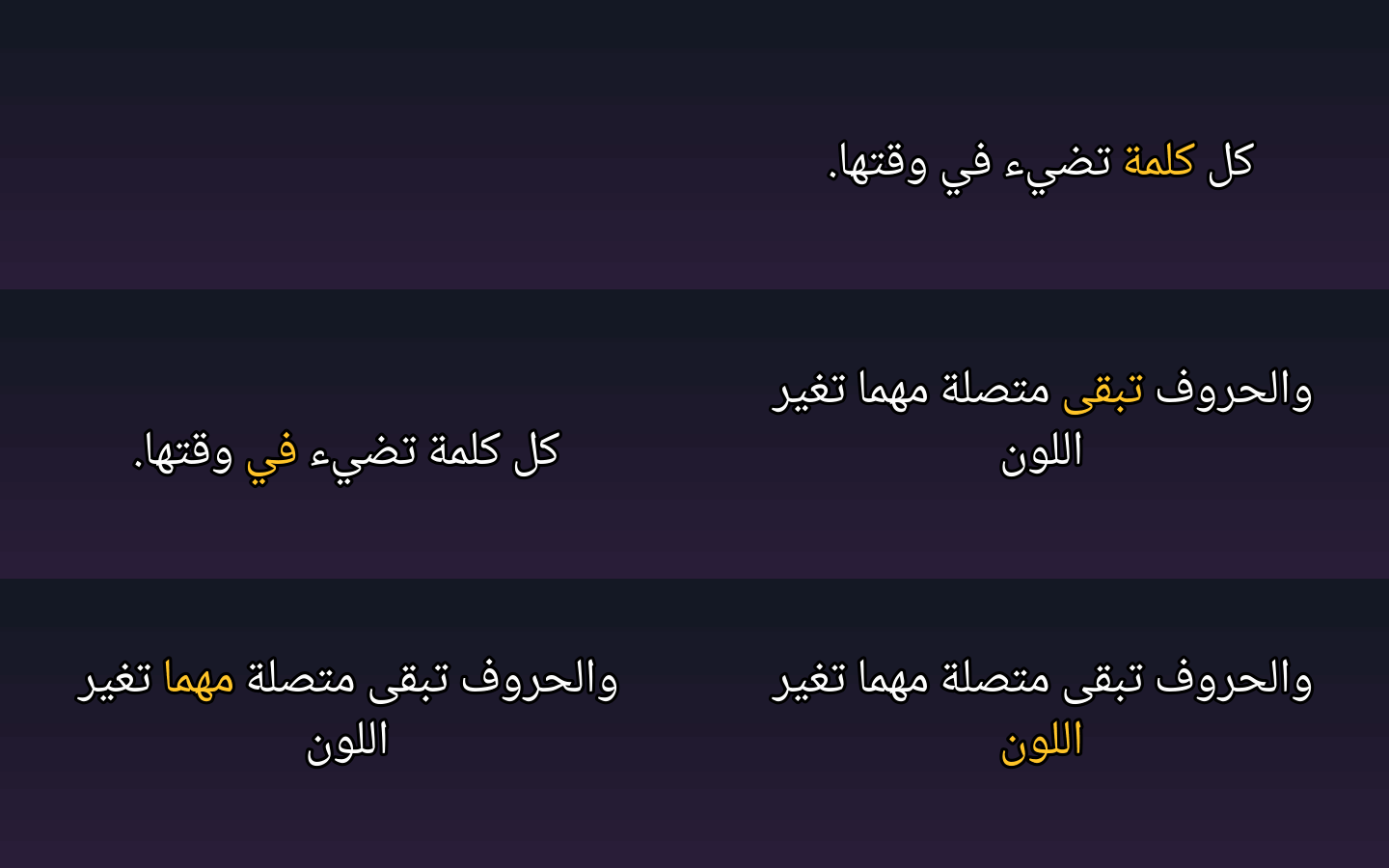
spans draws parts of the text in their own colour, for example the word being spoken
in a karaoke caption. The line is still shaped as one, so letters keep their joins where
the colour changes, and the layout is exactly the same as without spans.
text = "كل كلمة تضيء في وقتها"
start = text.index("تضيء")
khatt.draw_text(frame, (640, 650), text, size_px=64, anchor="md", fill="white",
                stroke_width=4, stroke_fill="black",
                spans=[(start, start + len("تضيء"), "gold")])
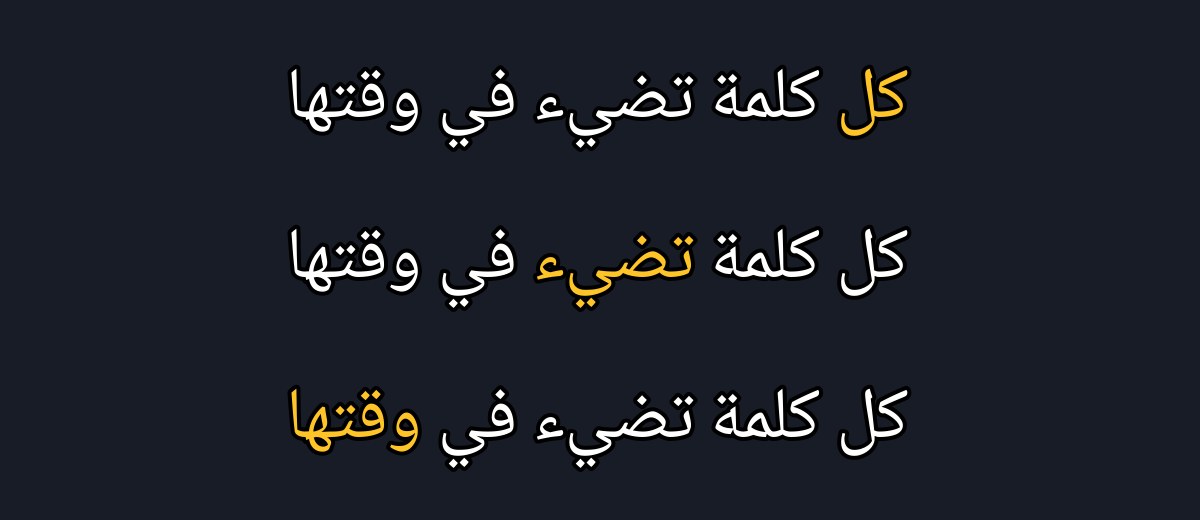
A span is
(start, end, fill)orkhatt.Span(start, end, fill): positions in the text as you pass it, sotext[start:end]is the part, and any colourfilltakes. Where spans overlap, the later one wins.khatt.caption_imagetakesspanstoo.
Arabic-Indic digits
digits="arabic-indic" draws the numbers in the text with Arabic-Indic digits, so
prices, dates and verse numbers don’t need converting first. Inside a number the
decimal point, the thousands comma and a % become ٫, ٬ and ٪:
khatt.draw_text(image, (20, 20), "السعر 1,250.5 ريال وخصم 15%", digits="arabic-indic")
# draws: السعر ١٬٢٥٠٫٥ ريال وخصم ١٥٪
draw_text, text_bbox, overlay, word_art, put_text, render_svg,
word_boxes, caption_image, video.TextClip and tk_image all take it, and
khatt.arabic_digits(text) returns the converted string. It replaces one character
with one, so spans positions stay the same. On the command line it is
khatt "صفحة 15" --arabic-digits.
Justified paragraphs and poetry
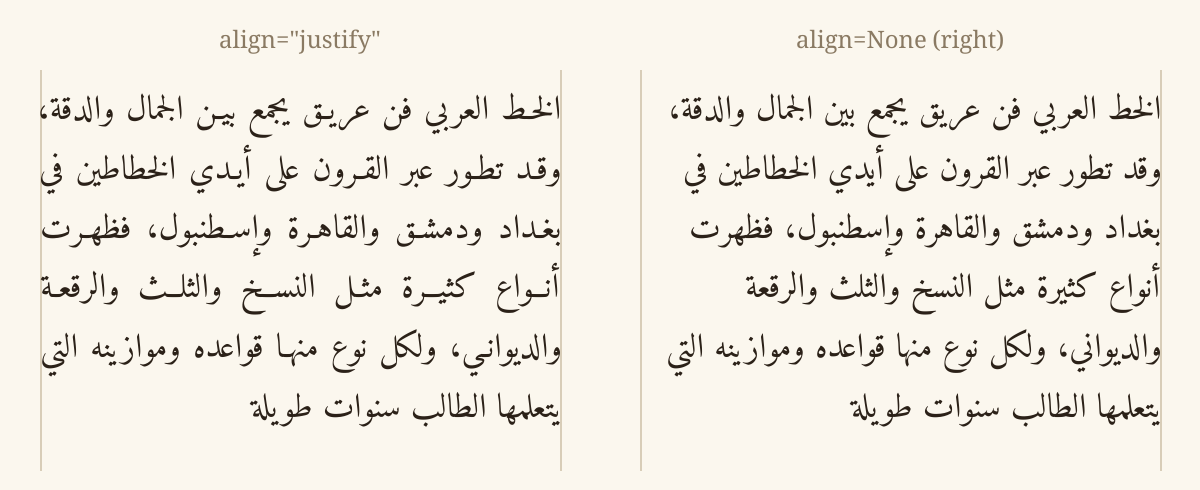
align="justify" with max_width fills every wrapped line of a paragraph but its last
to the full width, the way Arabic books are printed: a word stretches with a kashida
first (after a seen, sheen, sad or dad if it has one, else before its last letter), and
only then do the spaces widen. Short words and the name of God, whose ligature a kashida
would break, are left alone. Latin text justifies with its spaces.
khatt.draw_text(image, (580, 20), text, anchor="ra", size_px=34, max_width=540,
                align="justify")
text_bbox, overlay, word_art, word_boxes, render_svg, caption_image (as
text_align) and tk_image take it too.
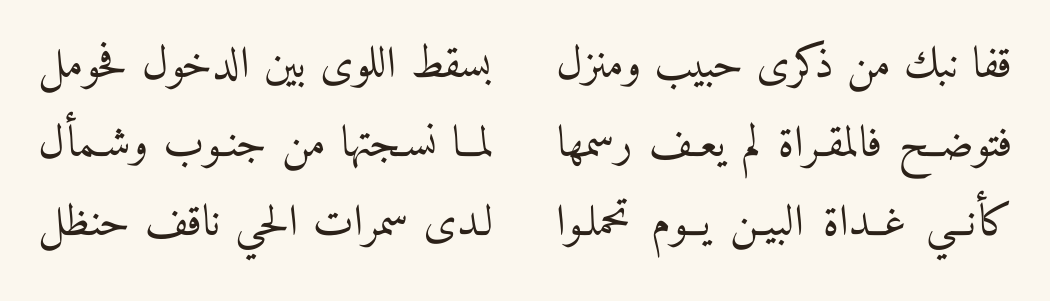
khatt.poem lays out verses the classical way: the first half of each verse on the
right, the second on the left, every half stretched with kashida to the same width so
both columns have straight edges:
art = khatt.poem("""قفا نبك من ذكرى حبيب ومنزل * بسقط اللوى بين الدخول فحومل
فتوضح فالمقراة لم يعف رسمها * لما نسجتها من جنوب وشمأل""", size_px=44)
art.save("poem.png")
Halves can also be split by a tab or three spaces, or passed as (first, second)
pairs. It returns an RGBA image, transparent unless you give a background, and takes
font, fill, gap, line_spacing, padding, an outline and digits.
Why not just ImageDraw.text? Pillow shapes Arabic only when it’s built with
Raqm, which most Windows installs aren’t. The usual workaround,
arabic_reshaper plus get_display, pre-shapes the text, so wherever native
shaping is available (Pillow with Raqm, matplotlib 3.11+) the text gets shaped
twice and comes out corrupted. khatt never hands text to another shaper: it
shapes and rasterizes with HarfBuzz and composites only the finished pixels, so
the output is identical everywhere.
khatt --doctor (API: khatt.doctor()) shows which shapers your environment
has and warns about that double-shaping trap:
$ khatt --doctor
khatt 0.17.0 (Python 3.13.15)
Pillow 12.3.0: no Raqm, so ImageDraw.text cannot shape Arabic
matplotlib: not installed
OpenCV: not installed
arabic_reshaper: not installed
khatt shapes text itself: its output is the same in every case above.
Give it your project, khatt --doctor src/, and it also lists every place that still
pre-shapes Arabic with arabic_reshaper or get_display. Strings that were already
reshaped can be turned back with khatt.unreshape(text). See
Moving off arabic_reshaper.
Where each word lands
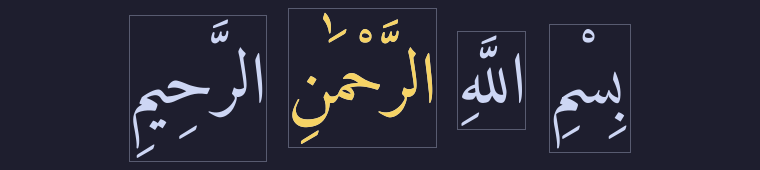
khatt.word_boxes lays the text out exactly as draw_text does and returns each word’s
box and its own coverage mask, in reading order. The text is still shaped as a whole,
so the boxes follow joined letters, and each word’s tashkeel stays inside its box.
Use it to highlight the word being recited, to label OCR training data word by word,
or to find which word a tap landed on:
words = khatt.word_boxes(text, xy=(20, 20), size_px=64)  # draw_text's arguments
for word in words:
    print(word.text, word.start, word.end, word.box)      # box: left, top, right, bottom

gold = Image.new("RGB", words[2].mask.size, "gold")
image.paste(gold, words[2].box[:2], words[2].mask)          # paint just the third word
The masks together are exactly the pixels draw_text paints. ranges=[(start, end), ...] measures any parts of the text instead of its words, such as a verse number.
OCR training data
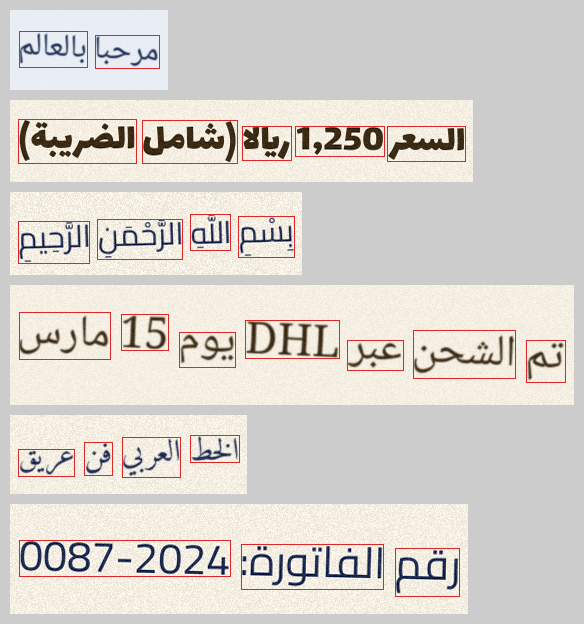
khatt.ocr_lines turns lines of text into training images for Arabic OCR. khatt draws
each label itself, so the label is exactly the text in the image, in typed order, with a
box for every word. Generators that pre-shape with arabic_reshaper store one string and
draw another, and on a Pillow with Raqm their images come out backwards.
for line in khatt.ocr_lines(texts, fonts=["amiri", "cairo", "noto-naskh"], size_px=(28, 44),
                            rotate=2, blur=0.8, noise=12, seed=1):
    line.image      # an RGB image
    line.text       # its label
    line.words      # each word's text and box, after any tilt
Fonts, sizes, colours and backgrounds are picked at random from what you give, and
seed repeats the same data. keep_tashkeel=False and digits="arabic-indic" change
the label along with the image. khatt.write_ocr_dataset(texts, "data/") saves
images/, a metadata.jsonl that datasets.load_dataset("imagefolder", data_dir="data/") loads, and a labels.txt (path, tab, label) for PaddleOCR. From the
command line:
khatt lines.txt --ocr-data data/ --font amiri,cairo --augment --seed 1
Pillow code you already have
khatt.pillow has Pillow’s own text calls, with the ImageDraw first: text,
textbbox and textlength take the same arguments as ImageDraw.text, textbbox
and textlength. Text with Arabic letters is drawn by khatt, so it is the same with or
without Raqm, and strings already shaped with arabic_reshaper and get_display are
turned back first, so they stay right when Pillow starts shaping too. Everything else
goes to Pillow untouched.
from PIL import ImageDraw, ImageFont
import khatt

draw = ImageDraw.Draw(image)
font = ImageFont.truetype("Amiri-Regular.ttf", 48)
khatt.pillow.text(draw, (20, 20), "مرحبا", fill="black", font=font)  # was draw.text(...)
For code you can’t change, such as a library that draws with ImageDraw.text,
khatt.pillow.routing() sends Pillow’s text drawing and measuring through khatt
while a with block lasts, and puts it back afterwards:
with khatt.pillow.routing():
    card = some_library.render_card(name="محمد")
Arabic letters the font has no glyphs for come from the bundled Noto Naskh Arabic.
OpenCV and NumPy arrays
cv2.putText draws Arabic as ??? before OpenCV 5.0 and as separate letters in
reverse order in 5.0. OpenCV 5.1 joins Arabic letters, but still reverses Arabic-Indic
digits (١٥٠ comes out ٠٥١), misplaces a bracket or quote that starts a line, and draws
text pre-shaped with arabic_reshaper as ?. khatt.put_text draws the same correct
text on every OpenCV version. It takes the same order of arguments and BGR colours, and
draws into the frame in place:
import cv2
import khatt

frame = cv2.imread("frame.png")
khatt.put_text(frame, "مرحبا بالعالم", (40, 80), size_px=48, color=(0, 255, 255))
org is the left end of the baseline, as in OpenCV. Grayscale and BGRA frames work
too, channels="rgb" takes RGB arrays, and only the part under the text is touched.
NumPy is only needed when you call it. More recipes: pygame,
Dear PyGui, Tkinter and Streamlit.
Tkinter labels and buttons
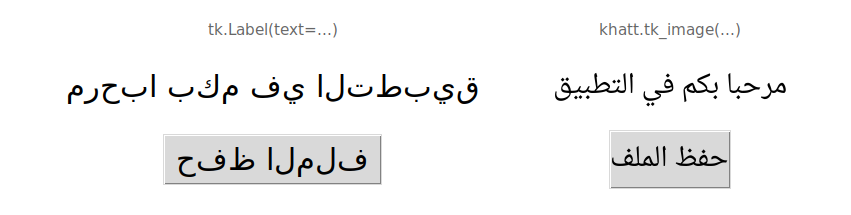
Tk on Linux draws Arabic as separate letters, left to right. khatt.tk_image draws the
text with khatt and gives Tk a picture of it, for a Label, a Button or a Canvas.
It looks the same on every system, needs no arabic_reshaper, and works with any font
file, which Tk can’t load itself:
import tkinter as tk
import khatt

root = tk.Tk()
save = khatt.tk_image("حفظ الملف", font="cairo", size_px=24)
tk.Button(root, image=save).pack()
root.mainloop()
Every image is a line high, so buttons in a row line up, and it takes draw_text’s
options (fill, background, max_width, align, padding, digits). Keep a
reference to the image, as for any PhotoImage. For CustomTkinter, give
khatt.caption_image(...) to customtkinter.CTkImage. Text typed into an Entry or
Text widget is still drawn by Tk.
Receipts for thermal printers
ESC/POS printers have no Arabic fonts, so receipts print as images. khatt.receipt_image
lays one out at the printer’s width, in black and white:
from escpos.printer import Usb
import khatt

receipt = khatt.receipt_image(
    [("قهوة عربية", "15.00"), ("كعكة", "12.50"), "---", ("المجموع", "27.50")],
    title="مقهى الخط",
    footer="شكرا لزيارتكم",
)
Usb(0x04B8, 0x0202).image(receipt)
A row is a line of text, or a
(start, end)pair: the item on the receipt’s starting side (the right, for Arabic) and the price on the other. A long item wraps without running into its price;"---"draws a dividing line and""a blank one.widthis"80mm"(576 dots, the default),"58mm"(384) or a number of dots. Alsofont(defaultnoto-naskh),size_px,title_size_px,line_spacing,margin,directionandthreshold.
Word art
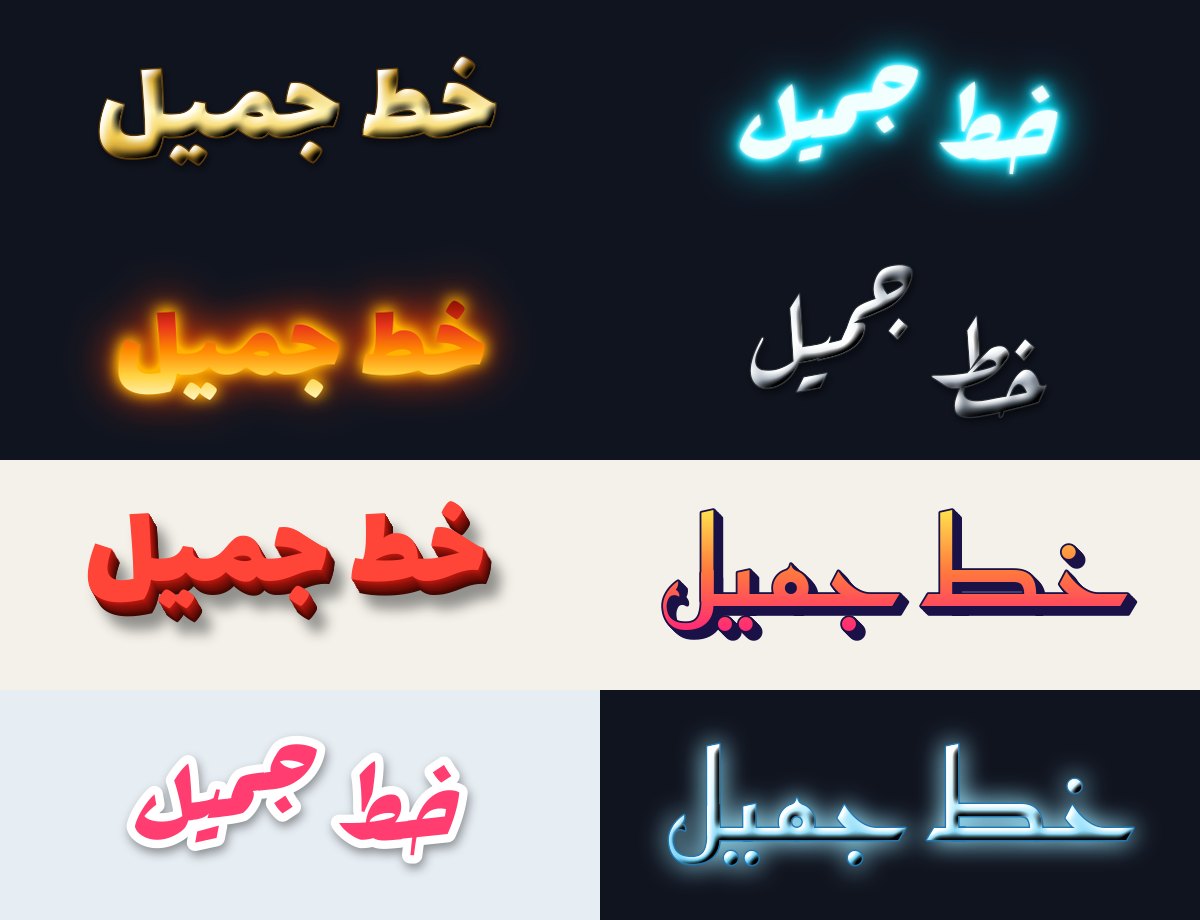
import khatt

# A finished image, as big as the art, on a transparent background.
khatt.word_art("خط جميل", effect="gold", size_px=200).save("gold.png")

# Any font works. Heavy ones show effects best, so word_art starts with lalezar.
khatt.word_art("خط جميل", effect="neon", font="rakkas").save("neon.png")

# Or straight onto your own image: draw_text and overlay both take an effect.
khatt.overlay(poster, "عرض خاص", (60, 40, 1140, 300), font="lalezar", effect="fire")
khatt "خط جميل" --effect gold -o gold.png
The presets are 3d, fire, gold, ice, neon, retro, silver and sticker.
khatt.list_effects() lists them.
Effects work on the finished text, never on single letters, so Arabic stays joined and tashkeel stays in place. To make your own, combine the parts. Lengths are fractions of the font size, so an effect looks the same at any size:
style = khatt.Effect(
    fill=khatt.Gradient(["#ffe14d", "#ff2975"]),    # or any colour; angle=0 runs left to right
    outline=0.02, outline_fill="navy",
    shadow=khatt.Shadow(offset=(0.05, 0.06), blur=0.03),
    glows=khatt.Glow(radius=0.12, color="#ff2975"),  # one glow, or several
    extrude=khatt.Extrude(depth=0.1, angle=45, color="#333"),
    bevel=0.03,
)
khatt.draw_text(image, (40, 40), "خط", size_px=120, effect=style)
Presets are plain Effect objects, so a variation is one line:
dataclasses.replace(khatt.get_effect("3d"), fill="#2563eb").
Text on curves
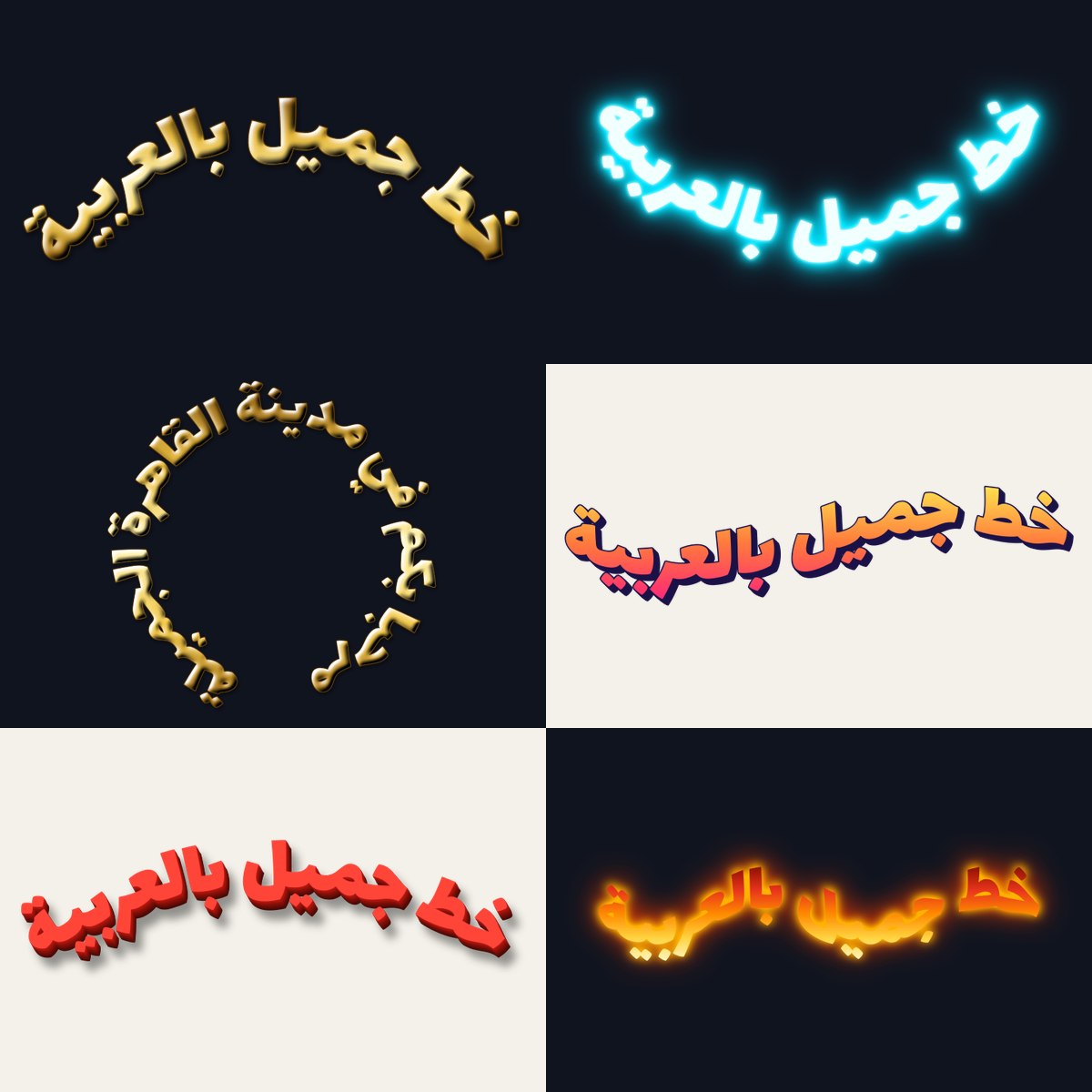
khatt.word_art("خط جميل", effect="gold", curve="arc").save("arc.png")
khatt.word_art("مرحبا بكم في القاهرة", effect="neon", curve="ring").save("ring.png")

# Make your own: how much of a circle, or how tall and how many waves.
khatt.word_art("خط جميل", curve=khatt.Arc(angle=200))
khatt.word_art("خط جميل", curve=khatt.Wave(height=0.3, waves=2))
khatt "خط جميل" --effect fire --curve wave -o wave.png
The presets are arc, smile, ring and wave. Placing letters one by one along a
curve is what breaks Arabic, because rotated neighbours stop meeting. khatt bends the
whole line as one sheet instead, so joins and tashkeel move with it. Text that is too
short for a tight curve raises a ValueError, because its letters would meet in the
middle; use a smaller angle or longer text.
Calligrams: text inside a shape
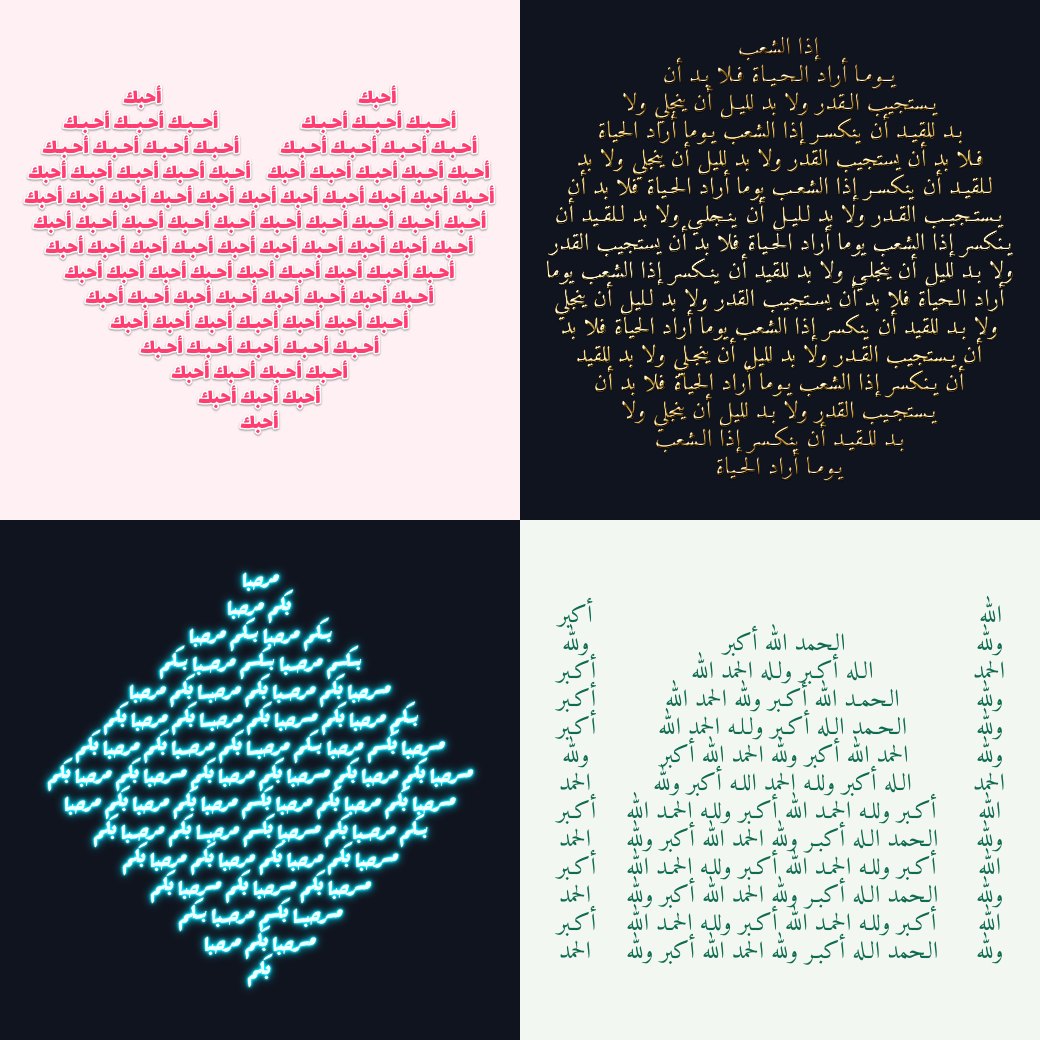
khatt.calligram("أحبك", shape="heart", effect="sticker", font="lalezar").save("heart.png")

# Your own shape: any image, whose dark or opaque pixels are the inside.
from PIL import Image
khatt.calligram("الله أكبر ولله الحمد", shape=Image.open("mosque.png")).save("mosque.png")
khatt "أحبك" --shape heart -o heart.png
khatt "إذا الشعب يوما أراد الحياة" --shape circle --no-repeat -o circle.png
The presets are arch (a pointed arch, as in a mihrab), circle, crescent, diamond
and heart. Lines run from the
top of the shape to the bottom, each as wide as the shape at that height, and never cut
a letter at the edge. The text repeats until the shape is full; repeat=False fits it
in once, as big as it goes. Arabic lines are stretched to their full width with kashida
(ـ), the way a calligrapher would, rather than with wider gaps, and never inside
lam-alef. A line that would have to grow by more than 30% is centred instead.
Shapes show best with several words a line, so parts thinner than a line of text, like
the points of a star, stay empty unless the text is small: pass size_px to choose.
SVG: vector outlines
svg = khatt.render_svg("خط جميل", font="lalezar", size_px=120, fill="#0b5394")
Path("khatt.svg").write_text(svg, encoding="utf-8")
khatt "خط جميل" --font lalezar -o khatt.svg
The same shaping and layout as images, with each glyph’s outline taken from the font, so
the SVG matches draw_text and stays sharp at any size: for the web, design tools,
printing, laser cutters and vinyl cutters. It takes draw_text’s options (fill,
align, max_width, line_spacing, spacing, outlines with stroke_width,
fallback_fonts) plus padding and background. Each glyph is its own path, so where
Arabic letters join, their outlines overlap: for a cutting machine, weld them first
(Cricut Design Space: Weld). Effects, curves and calligrams are images only for now.
Zakhrafa: decorated names
khatt.zakhrafa("محمد")             # مـحـمـد
khatt.zakhrafa("محمد", "long")     # مـــحـــمـــد
khatt.zakhrafa("محمد", "royal")    # ꧁༺ مـ͜͡ـحـ͜͡ـمـ͜͡ـد ༻꧂
khatt.zakhrafa("نور الهدى", "hearts")
khatt "محمد" --zakhrafa all
Decorated text to copy and paste, for display names and bios. The styles are
brackets, crown, dots, flowers, hearts, long, royal, stars, tatweel and
waves (khatt.list_zakhrafa()). Unlike most zakhrafa sites, khatt only decorates where
letters join, and never inside lam-alef, so the words stay joined and readable, and
tashkeel stays with its letter. The tatweel and long styles also draw with
word_art, for a stretched name in gold or neon.
Screen readers and search engines struggle with decorated text, so keep it for names, not for text people need to find or hear.
Video captions (moviepy)
khatt.video.TextClip is a drop-in for moviepy’s TextClip: same arguments,
same order, same clip sizes, but the text is shaped by khatt. moviepy’s own
TextClip draws with Pillow, so on Windows (no Raqm) Arabic comes out as
disconnected letters in reverse order, and with Pillow 11 or later it cuts off
the bottom of label clips (descenders, kasra, tanween), English included.
from moviepy import ColorClip, CompositeVideoClip
from khatt.video import TextClip  # instead of: from moviepy import TextClip

caption = TextClip(
    text="بِسْمِ اللَّهِ الرَّحْمَٰنِ الرَّحِيمِ",
    font_size=56, color="white", stroke_color="black", stroke_width=3,
    method="caption", size=(1000, None),  # wraps to 1000 px
).with_duration(3).with_position(("center", "bottom"))
video = CompositeVideoClip([ColorClip((1280, 720), (20, 30, 60), duration=3), caption])
video.write_videofile("caption.mp4", fps=24)
Every moviepy 2.2 argument works:
font_size,size,margin,color,bg_color,stroke_color,stroke_width,method("label"or"caption", with the automatic font size),text_align,horizontal_align,vertical_align,interline,transparent,duration,filename.Differences:
fonttakes a bundled name or a font path and defaults to Amiri;text_aligndefaults to aligning each paragraph by its direction (Arabic right, English left) instead of"left";filenameis read as UTF-8;keep_tashkeel=Falsestrips diacritics.Clips are as tall as moviepy’s formula says (ascent + descent + outline, plus
interlinespacing per line), and taller only if stacked diacritics reach beyond it, so nothing is cut off. The exception: words aren’t broken, so if you fix bothsizeandfont_sizeand a word is wider than the width, the edges are cut and you get akhatt.TextOverflowWarning.Without moviepy,
khatt.caption_image(text, ...)takes the same arguments and returns the frame as a Pillow image, e.g. for ffmpeg overlays.
Word-timed captions
word_captions turns word timings into captions where each word lights up as it’s
said. The highlighted word is drawn with spans, so its letters stay joined to the
rest of the line.
import whisper  # or faster-whisper, whisperX, stable-ts
from moviepy import CompositeVideoClip, VideoFileClip
import khatt
from khatt.video import word_captions

video = VideoFileClip("talk.mp4")
result = whisper.load_model("small").transcribe("talk.mp4", word_timestamps=True)
words = khatt.words_from_whisper(result)

captions = word_captions(words, video.size, highlight_color="gold")
CompositeVideoClip([video, captions]).write_videofile("talk-captioned.mp4")
khatt.words_from_whisperreads the results of openai-whisper, faster-whisper, whisperX and stable-ts, with word timestamps on. Or build the list yourself:khatt.Word("مرحبا", start=0.0, end=0.4), in seconds.Lines break at
max_chars(42), after a pause longer thanmax_gapseconds (1.0) or at the end of a sentence. A line stays upholdseconds (0.5) after its last word.highlight="spoken"keeps the words already said lit, instead of only the current one. Alsofont,font_size,color,highlight_color,stroke_color,stroke_width,bg_colorandbottom(the space below, as a fraction of the height).Without moviepy,
khatt.caption_steps(words)gives each step’s start, end, text and highlightedspans, ready forkhatt.caption_image(step.text, spans=...).
Quran recitations
quran_captions lights up each word of a recitation, one verse at a time, from the free
word timings of Quran.com or Tarteel QUL. Each verse ends with its number in the verse
medallion, every mark stays, and the lines are spaced for the marks above and below
them.
import json
from moviepy import VideoFileClip, CompositeVideoClip
import khatt
from khatt.video import quran_captions

# Word timings: Quran.com (chapter_recitations/{reciter}/{chapter}?segments=true)
# or a Tarteel QUL download. Text: the verses, in the edition the timings were made for.
timings = json.load(open("fatiha-timings.json", encoding="utf-8"))
verses = json.load(open("fatiha-verses.json", encoding="utf-8"))  # {"1:1": "بِسْمِ ...", ...}

video = VideoFileClip("fatiha.mp4")
words = khatt.words_from_quran(timings, verses)
CompositeVideoClip([video, quran_captions(words, video.size)]).write_videofile("out.mp4")
The text comes from you and is drawn exactly as given: a
{"1:1": text}mapping, word lists, or Quran.com’sversesresponse withwords. Words are counted as Quran.com counts them: a pause sign standing alone, such asۛ, stays with the word before it, and a basmala that starts a surah’s first verse (as in Tanzil’s text) is shown before the verse. Editions still differ in a few places, so with Quran.com timings its ownversesresponse is the surest text; you get a warning when a verse has more words than its timings cover.khatt shapes every one of the 6,236 verses of the Uthmani text exactly as HarfBuzz does, in Amiri (the default) and Noto Naskh Arabic, and in Amiri Quran and Scheherazade New from
pip install khatt-fonts.verse_numbers=Falseleaves out the verse medallions. The other options areword_captions’s:highlight="spoken", colours,font_size,max_chars(60, for long verses) andhold(1.5 seconds).
Terminal art
khatt started as the Arabic FIGlet that FIGlet can’t be: Arabic as Unicode art in the terminal.
⠀⠀⠀⠀⠀⠀⠀⠀⠀⠀⢀⣾⡄
⠀⠀⠀⠀⠀⠀⠀⠀⠀⠀⢺⣿⣿⣄
⠀⠀⠀⠀⠀⠀⠀⠀⠀⠀⢸⣿⣿⠟
⠀⠀⠀⠀⠀⠀⠀⠀⠀⠀⠈⣿⣿
⠀⠀⠀⠀⠀⠀⠀⠀⠀⠀⠀⣿⣿
⠀⠀⠀⠀⠀⠀⠀⠀⠀⠀⠀⢻⣿⡆⠀⠀⠀⠀⠀⠀⠀⠀⠀⠀⠀⠀⠀⠀⠀⠀⠀⠀⠀⠀⠀⠀⠀⠀⠀⠀⠀⠀⣤⣄⡀
⠀⠀⠀⠀⠀⠀⠀⠀⠀⠀⠀⢸⣿⡇⠀⠀⠀⠀⠀⠀⠀⠀⠀⠀⠀⠀⠀⠀⠀⠀⠀⠀⠀⠀⠀⠀⠀⠀⠀⠀⢀⣾⣿⣿⣿⡗
⠀⠀⠀⠀⠀⠀⠀⠀⠀⠀⠀⢸⣿⡇⠀⠀⠀⠀⠀⠀⠀⠀⠀⠀⠀⠀⠀⠀⠀⠀⠀⠀⠀⠀⠀⠀⠀⠀⠀⠀⠈⠛⢿⣿⠟
⠀⠀⠀⠀⠀⠀⠀⠀⠀⠀⠀⠘⣿⣇⠀⠀⠀⠀⠀⠀⠀⠀⠀⠀⠀⠀⠀⠀⠀⠀⠀⠀⠀⠀⠀⠀⠀⠀⠀⠀⠀⠀⠀⠈
⠀⠀⠀⠀⠀⠀⠀⠀⠀⠀⠀⠀⣿⣿⠀⠀⠀⠀⠀⠀⠀⠀⣀⣠⣄⣀
⠀⠀⠀⠀⠀⠀⠀⠀⠀⠀⠀⠀⣿⡏⠀⠀⠀⠀⣀⣤⣶⣿⣿⣿⣿⣿⣷⡄⠀⠀⠀⠀⣠⣶⣿⣿⣷⣶⣤⣄⣀
⠀⠀⠀⠀⠀⠀⠀⠀⠀⠀⠀⠀⣿⠇⠀⣀⣴⣿⣿⣿⣿⣿⣿⣿⣿⣿⣿⣿⠀⠀⢠⣾⣿⣿⣿⣿⣿⣿⣿⣿⣿⣿⣶⣦⣤⣀⣀
⠀⠀⠀⠀⠀⠀⠀⠀⠀⠀⠀⠀⣿⣤⣾⣿⠟⠋⠉⠀⠀⠀⠀⠙⢿⣿⣿⡟⠀⠀⠘⠉⠉⠉⠉⠉⠉⠙⠛⠿⣿⣿⣿⣿⣿⣿⣿⣿⣿⣷⣶⣶⣶⣶⣶⡶
⠀⠀⠀⠀⠀⠀⠀⠀⠀⠀⢀⣴⣿⠟⠋⠀⠀⠀⠀⠀⠀⣀⣠⣤⣶⣿⡿⠁⠀⠀⠀⠀⠀⠀⠀⠀⠀⠀⠀⣀⣤⣽⣿⣿⣿⣿⣿⣿⣿⣿⣿⣿⣿⣿⡿⠁
⣀⣀⣀⣀⡀⠀⣀⣀⣀⣴⣿⣿⣥⣤⣤⣤⣴⣶⣶⣿⣿⣿⣿⣿⣿⣋⣀⡀⠀⠀⣀⣀⣀⣀⣤⣤⣶⣾⣿⣿⣿⡿⠿⠛⠋⠉⠁⠀⠀⠀⠀⠀⠀⠈
⠈⢿⣿⣿⣿⣿⣿⣿⣿⣿⣿⣿⣿⣿⣿⣿⣿⣿⣿⣿⣿⣿⣿⣿⣿⣿⣿⣿⣿⣿⣿⣿⣿⣿⣿⣿⡿⠟⠋⠉
⠀⠀⠙⠿⢿⣿⣿⣿⣿⣿⣿⣿⣿⠿⠿⠿⠿⠿⠛⠛⠉⠛⠛⠻⠿⠿⠿⠿⠿⠿⠿⠿⠟⠛⠉⠁
(«خط», “khatt”: line, script or calligraphy. Amiri font, braille style.)
                              -%+.
       :@.           =:       *+--  =@   *#                       =@
       -@.           +:        +=   =@   #%                       +@
   %+  -@.   =%   =**+***:     @#   =@   *%       -*****%+   -%.  +@
   @*  -@.   +@         +@.    %*   =@   *%      -@-    @*   -@.  +@
   @+  -@.   +@         .@-    %*   =@   *%      +@     @*   -@.  +@
   @+  -@.   +@         :@-    %#   =@   #%      :@-    @*   -@.  +@
   @*  :%****##**********%: +**%#***#%   +#       -*****%#**+*%   =%
  .@=        :-                                             :- -.
+*%+         -*                                             =+ *:
(«ايه الأخبار», “What’s the news?”. Cairo font, ascii style.)
Colour
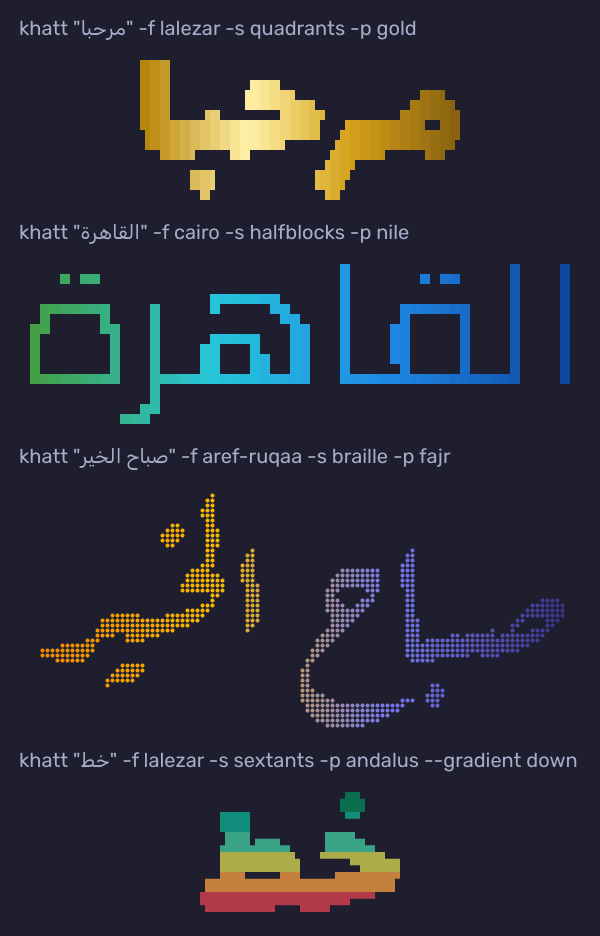
--palette (-p) colours the art with a gradient. It starts at the right edge, where an
Arabic line starts, unless --gradient says ltr, down or up. --bands gives solid
stripes instead of a blend, and any colours work in place of a palette name:
khatt "مرحبا" -s quadrants -p gold
khatt "القاهرة" -f cairo -s halfblocks -p nile
khatt "خط" -s sextants -p andalus --gradient down
khatt "مصر" -s halfblocks -p "#ce1126,white,black" --gradient down --bands
khatt --list-palettes          # andalus, damask, desert, fajr, gold, nile
Colour is printed only to a terminal, and never with NO_COLOR set; --color always
or never overrides that. Terminals that announce 24-bit colour (COLORTERM=truecolor,
Windows Terminal) get exact colours, others the nearest of 256. The same colours go into
every saved file:
khatt "مرحبا" -p gold -o art.png --bg "#1e1e2e"   # image
khatt "مرحبا" -p gold -o art.svg --svg art        # vector shapes, sharp at any size
khatt "مرحبا" -p gold -o art.html                 # coloured text in a <pre>
khatt "مرحبا" -p gold -o art.ans                  # with terminal colour codes, for cat
Letter art
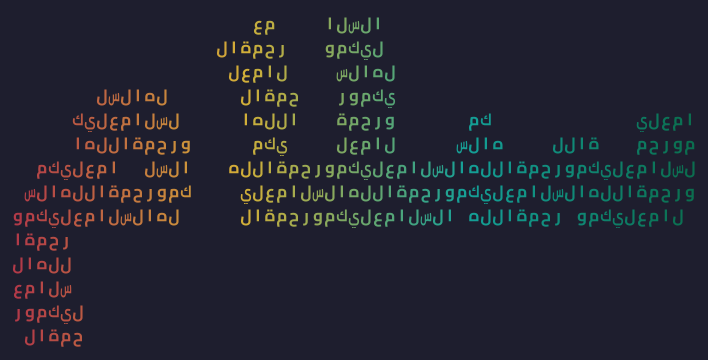
The letters style draws a word out of letters: its own, or those of a phrase given
with --fill. An Arabic fill is read right to left along each row, so the art spells the
phrase out; an Arabizi or Latin fill runs left to right.
khatt "سلام" -s letters                                  # سلام made of سلام
khatt "سلام" -s letters --fill "السلام عليكم" -p andalus
khatt "حب" -s letters --fill "7abibi"                    # Arabizi works too
khatt "سلام" -s letters --fill "السلام عليكم" -o salam.png
Each letter takes its isolated form, a character of its own that terminals can’t join to
its neighbours. Terminals and editors that lay Arabic out themselves would still reverse a
run of them, so khatt wraps those lines in a left-to-right override (it guesses your
terminal, see --rtl-terminal; saved .txt files always get it). Images draw the letters
in Cairo, and HTML keeps every letter in its cell. In Python:
khatt.render("سلام", style="letters", fill="السلام عليكم").
Arabizi
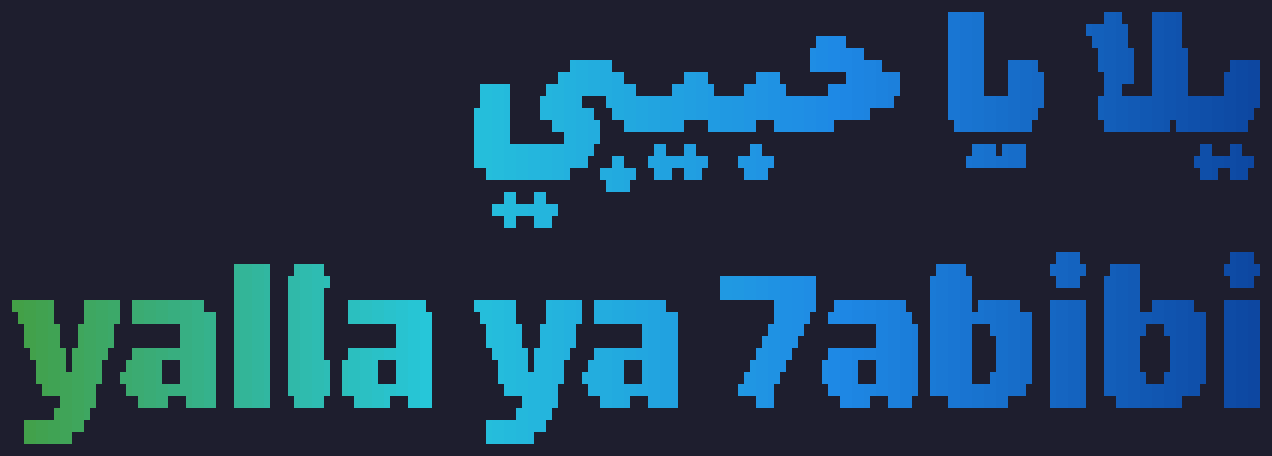
Arabizi (Franco-Arabic) writes Arabic in Latin letters, with digits for the sounds Latin
lacks: 2 ء, 3 ع, 5 خ, 6 ط, 7 ح, 8 ق, 9 ص. --arabizi writes it in Arabic letters before
drawing it, and --arabizi both keeps the Arabizi as a line under the Arabic:
khatt "yalla ya 7abibi" --arabizi both -s quadrants -p nile
khatt "salam 3alaykom" --arabizi -a type          # works with every option
khatt "ana fahem" --arabizi --arabizi-words my-words.txt
Arabizi has no fixed spelling, so khatt uses a short list of common words and simple
rules: the digit letters, letter pairs (sh, kh, gh, th, dh), an alef for a
vowel that starts a word, long vowels where they are doubled, in a diphthong or in the
last syllable, ة for the feminine -a, and el-/al- as ال. It can’t know what
Arabizi leaves out: whether t is ت or ط, or which syllable is long (fahem comes
out فهيم). Your own spellings, one arabizi = عربي per line in a file given to
--arabizi-words, always win. khatt never converts Latin text by itself; it only
suggests --arabizi when the input looks like Arabizi. In Python:
khatt.from_arabizi("7abibi") and khatt.from_arabizi(text, {"fahem": "فاهم"}).
Frames and canvases
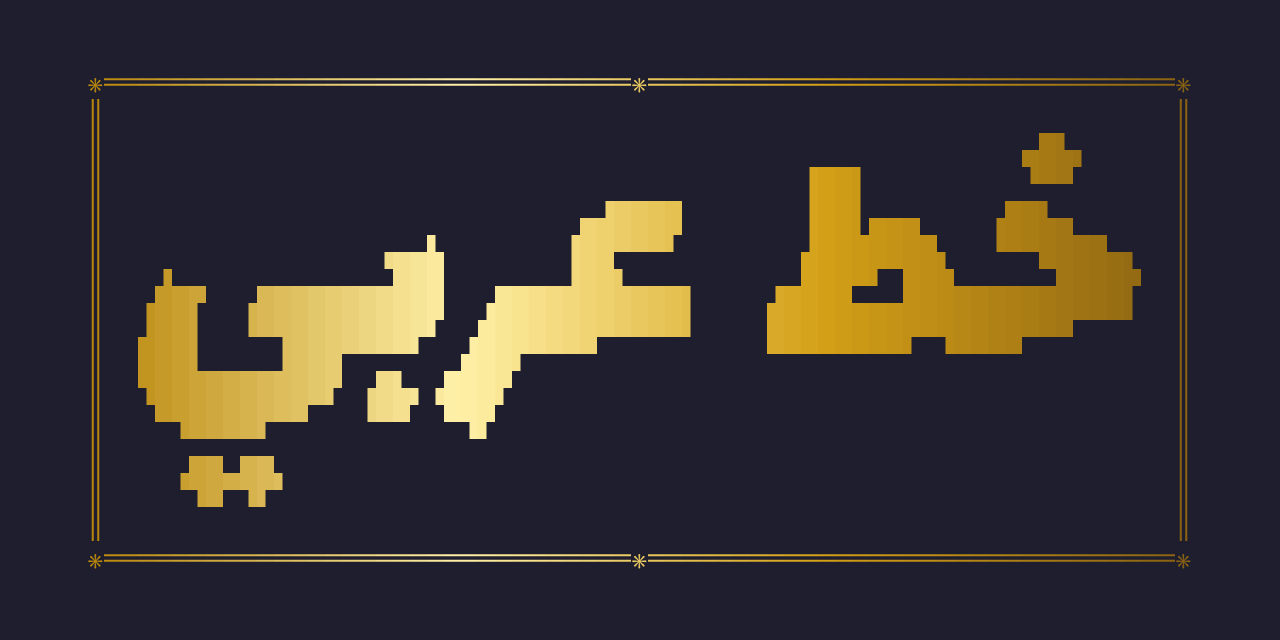
--frame puts the art inside a frame of box-drawing lines: single, round, double,
heavy, or lawha, after the framed panels of Arabic calligraphy, with ۞ at its corners
and in the middle of its top and bottom. It stays text in the terminal, and images draw
its lines as crisp shapes.
--canvas makes an image of a set size with the art as large as fits, centred: social
(1280×640, the size of a GitHub repository’s social preview and of link previews),
square (1080×1080), story (1080×1920), header (1500×500) and wallpaper
(1920×1080), or any WIDTHxHEIGHT.
khatt "خط" -s quadrants --frame round
khatt "خط عربي" -f lalezar -s quadrants -p gold --frame lawha --canvas social --bg "#1e1e2e" -o card.png
khatt "مرحبا" -a type --frame double -o hello.gif   # frames work in animations too
khatt --list-frames
khatt --list-canvases
In Python: khatt.frame_art(art, "lawha") and khatt.art_to_image(art, canvas="social").
Animation
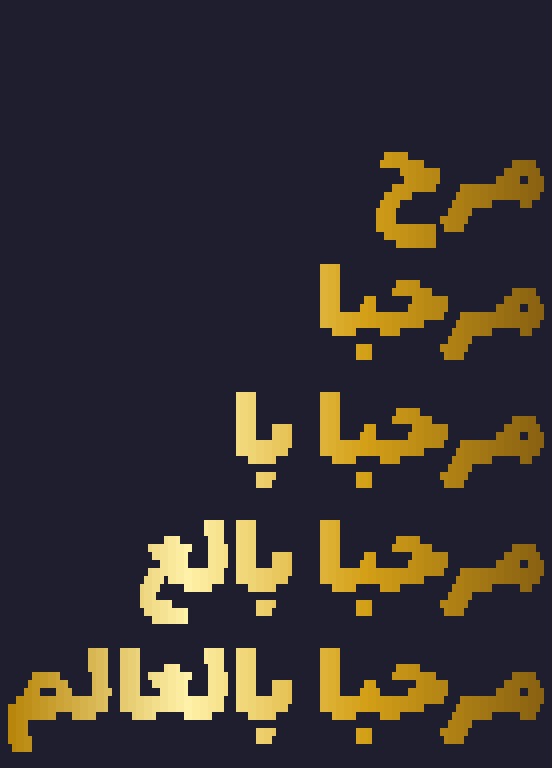
Typing effects usually add one letter at a time, which tears Arabic apart. khatt shapes every frame as a whole, so each new letter takes its end-of-word form and then joins the next one as it arrives, the way the word is written by hand:
khatt "مرحبا بالعالم" -a type -s quadrants -p gold     # plays in the terminal
khatt "القاهرة" -a wipe -p nile                         # uncovered from the right
khatt "محمد" -a kashida -s braille                      # stretches with tatweel and settles
khatt "خط" -a shimmer -s sextants -p damask --loop 0    # colours flow until Ctrl+C
khatt "مرحبا بالعالم" -a type -p gold -o hello.gif --bg "#1e1e2e"
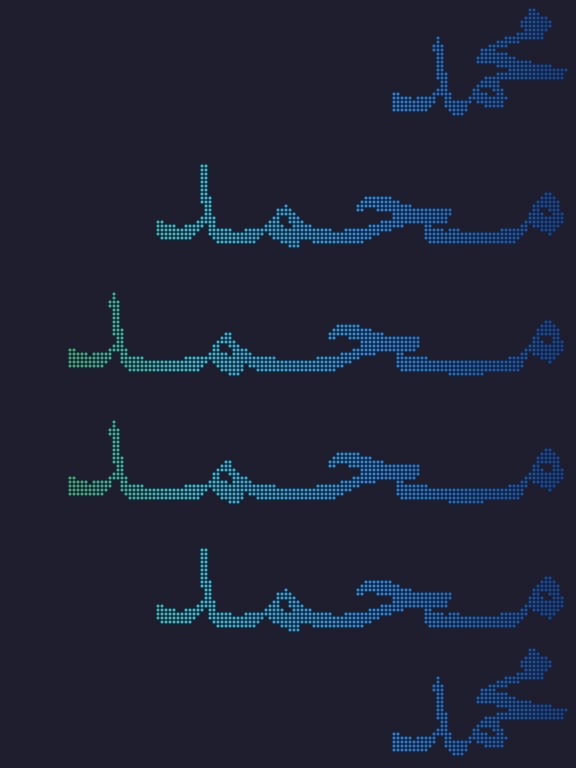
Every frame shares one grid with the line’s start fixed (the right edge for Arabic), so
nothing jumps, and a palette’s gradient stays in place while the text changes. --fps
sets the speed and --loop how many times it plays in the terminal. Save it as .gif,
.png (APNG), .webp or .cast, an asciinema recording. In
Python:
animation = khatt.animate("مرحبا بالعالم", "type", style="quadrants", palette="gold")
animation.play()                                  # in the terminal
animation.save("hello.gif", bg="#1e1e2e")
animation.frames                                  # the text art of every frame
khatt –fetch
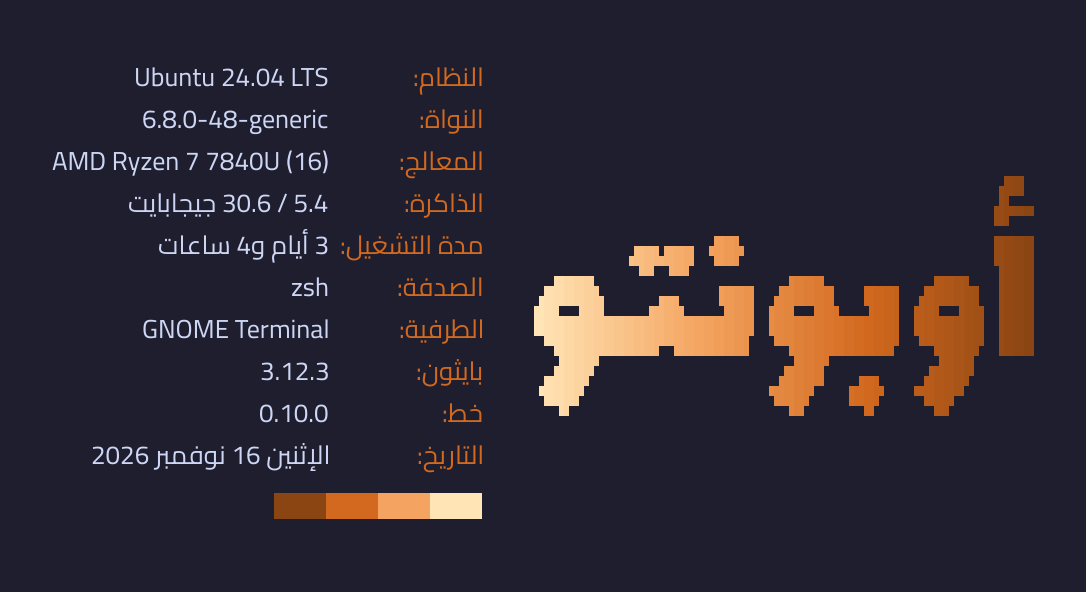
Your machine’s details under Arabic labels, beside a logo, like neofetch. The logo is the system’s name in Arabic letters (ويندوز, ماك, أوبونتو, فيدورا, آرتش…) unless you give your own text:
khatt --fetch
khatt --fetch "مرحبا" -p nile                 # your own logo and palette
khatt --fetch -s braille --arabic-digits       # Eastern Arabic digits: ٣٫٥ / ١٦٫٠
khatt --fetch --private -o card.png            # without user@host, as an image
It shows the system, kernel, processor, memory, uptime (in Arabic grammar: ساعتان,
3 أيام, 11 يومًا), shell, terminal, Python, khatt and the date. With
pip install hijridate it adds the Hijri date of the Umm al-Qura calendar.
Most terminals (Windows Terminal, iTerm2, Alacritty, kitty, WezTerm) draw Arabic
letters apart and backwards, so khatt gives them the labels with the letters already
joined and in display order. Terminals that lay Arabic out themselves (Konsole, GNOME
Terminal and other VTE terminals, mlterm, macOS Terminal) get the text as typed. khatt
guesses which kind yours is; --rtl-terminal yes or no settles it. Images
(.png, .webp, .jpg) are shaped by HarfBuzz like everything else khatt draws, and
.txt and .ans save the card as text.
In Python, khatt.fetch() returns the card and khatt.fetch_image() draws it;
both take facts= to show your own lines instead of the machine’s.
Python API
import khatt

print(khatt.render("مرحبا"))                          # blocks style, size 10
print(khatt.render("خط", style="braille", size=16))   # bigger, high effective resolution
print(khatt.render("القاهرة", font="cairo", style="ascii", threshold=0.4))
print(khatt.render("السلام عليكم ورحمة الله", width=60))  # wraps at 60 columns
print(khatt.render("مرحبا\nKhatt 2026", font="rubik"))    # one art line per text line

art = khatt.render("مرحبا", style="braille")
khatt.art_to_image(art, fg="white", bg="#1e1e2e").save("art.png")  # the art as a picture

art = khatt.render("مرحبا", style="quadrants")
print(khatt.color_art(art, "gold"))                       # colour codes for the terminal
print(khatt.color_art(art, ["#ce1126", "white", "black"], direction="down", bands=True))
khatt.art_to_image(art, palette="nile", bg="#1e1e2e").save("art.png")
open("art.svg", "w").write(khatt.art_to_svg(art, palette="nile"))
open("art.html", "w").write(khatt.art_to_html(art, palette="nile"))

image = khatt.render_image("مرحبا\nKhatt 2026")  # the plain text: Pillow image, black on white
image.save("khatt.png")

khatt.list_fonts()   # ['amiri', 'cairo', 'noto-naskh', 'rubik']
khatt.list_styles()    # ['ascii', 'blocks', 'braille', 'halfblocks', 'quadrants', 'sextants']
khatt.list_palettes()  # ['andalus', 'damask', 'desert', 'fajr', 'gold', 'nile']
CLI
khatt "مرحبا"                          # render to the terminal
khatt "خط" --style braille --size 16
khatt "القاهرة" -f cairo -s ascii -t 0.4
khatt "خط" -f ./MyFont.ttf             # any .ttf/.otf font file
echo "سلام" | khatt                    # stdin
printf 'سطر أول\nسطر ثاني' | khatt     # multi-line input
khatt "خط" --output art.txt            # save the art
khatt "خط" -s braille -o art.png       # save the art as an image
khatt "خط" -s ascii -o art.png --fg "#e5e5e5" --bg "#1e1e2e"   # terminal colours
khatt "خط" -o logo.png --bg none       # transparent background
khatt "خط" -o khatt.png --png text     # the plain high-resolution text instead
khatt "خط" -s quadrants -p gold        # in colour (see Colour above)
khatt --version                        # or python -m khatt --version
khatt --list-fonts
khatt --list-styles
khatt --doctor                         # which Arabic shapers are installed
Arabic diacritics (tashkeel) are stripped from text art by default, since they’re
illegible at character-grid resolution. Pass --keep-tashkeel (API:
render(..., keep_tashkeel=True)) to render them. Plain-text images
(--png text, render_image) keep them by default, since they have the
resolution to show them: pass --strip-tashkeel (API:
render_image(..., keep_tashkeel=False)) to remove them.
In art images, braille dots, shade blocks and block mosaics are drawn as shapes, so
they stay crisp at any size; ascii characters are drawn in a bold sans font. Each
character gets a cell twice as tall as it is wide (12 × 24 px by default;
API: cell_width=), matching the terminal the art was sized for.
Sizing and wrapping
Like FIGlet, letters have a fixed size and long text wraps:
size(--size) is the font size in character rows per em (default 10). It gives the same on-screen height in every style;braillejust packs 4× the dots into it.width(--width) is the maximum width. Lines wrap at spaces; a single word that can’t fit on its own shrinks the whole render until it does. The CLI defaults to your terminal’s width, the API to 80 columns;width=Noneturns wrapping off.Line breaks in the input start new lines. Right-to-left paragraphs are right-aligned, left-to-right ones left-aligned.
--fit(API:size=None) is the 0.1.0 behaviour: scale each line to fill exactlywidthcolumns, without wrapping.
Styles
Style |
Ramp |
Notes |
|---|---|---|
|
|
Default; reads well at any size |
|
|
Pure ASCII, maximum compatibility |
|
|
2×4 dots per cell, 8× the effective resolution |
|
|
2 blocks per cell, top and bottom; solid and bold |
|
|
2×2 blocks per cell |
|
|
2×3 blocks per cell; needs a font with Unicode 13’s legacy computing symbols, such as Cascadia Code or Iosevka |
|
|
The text’s own letters, or a phrase with |
Why FIGlet can’t do this
FIGlet fonts map one character to one fixed glyph. Arabic doesn’t work that way:
Every letter has up to four positional forms (isolated / initial / medial / final).
Some letter pairs form mandatory ligatures: ل + ا must become لا.
The script is cursive: letters connect, and the connections carry the word’s shape.
Text runs right-to-left, and real text mixes RTL words with LTR numbers and names.
khatt sidesteps glyph tables entirely with a rasterize-then-map pipeline:
text ──► HarfBuzz shaping ──► HarfBuzz rasterization ──► density mapping ──► art
         (positional forms,    (real Arabic fonts,        (blocks / ascii /
          ligatures, bidi)      hi-res grayscale)          braille ramps)
The result is genuine calligraphic letterforms from real fonts, approximated in terminal characters.
Fonts
khatt bundles eight Arabic fonts:
Font |
Family |
Character |
|---|---|---|
|
Amiri |
Classical naskh, rich calligraphic detail |
|
Aref Ruqaa |
Ruqaa, the everyday handwritten style |
|
Cairo |
Geometric, modern, bold strokes |
|
Lalezar |
Heavy display letters, the default for word art |
|
Noto Naskh Arabic |
Clean, highly legible naskh |
|
Rakkas |
Bold, brushy display letters |
|
Reem Kufi |
Modern Kufi, geometric and upright |
|
Rubik |
Strong Latin + Arabic pairing for mixed text |
A style name works as a font too: naskh, ruqaa, kufi, display and modern.
All fonts are licensed under the SIL Open Font License 1.1, preserved verbatim in
khatt/fonts/LICENSES/.
More fonts. pip install khatt-fonts adds 22 more open Arabic fonts in their own
package, so khatt itself stays small. khatt finds them on its own, and they are used by
name, like the bundled ones:
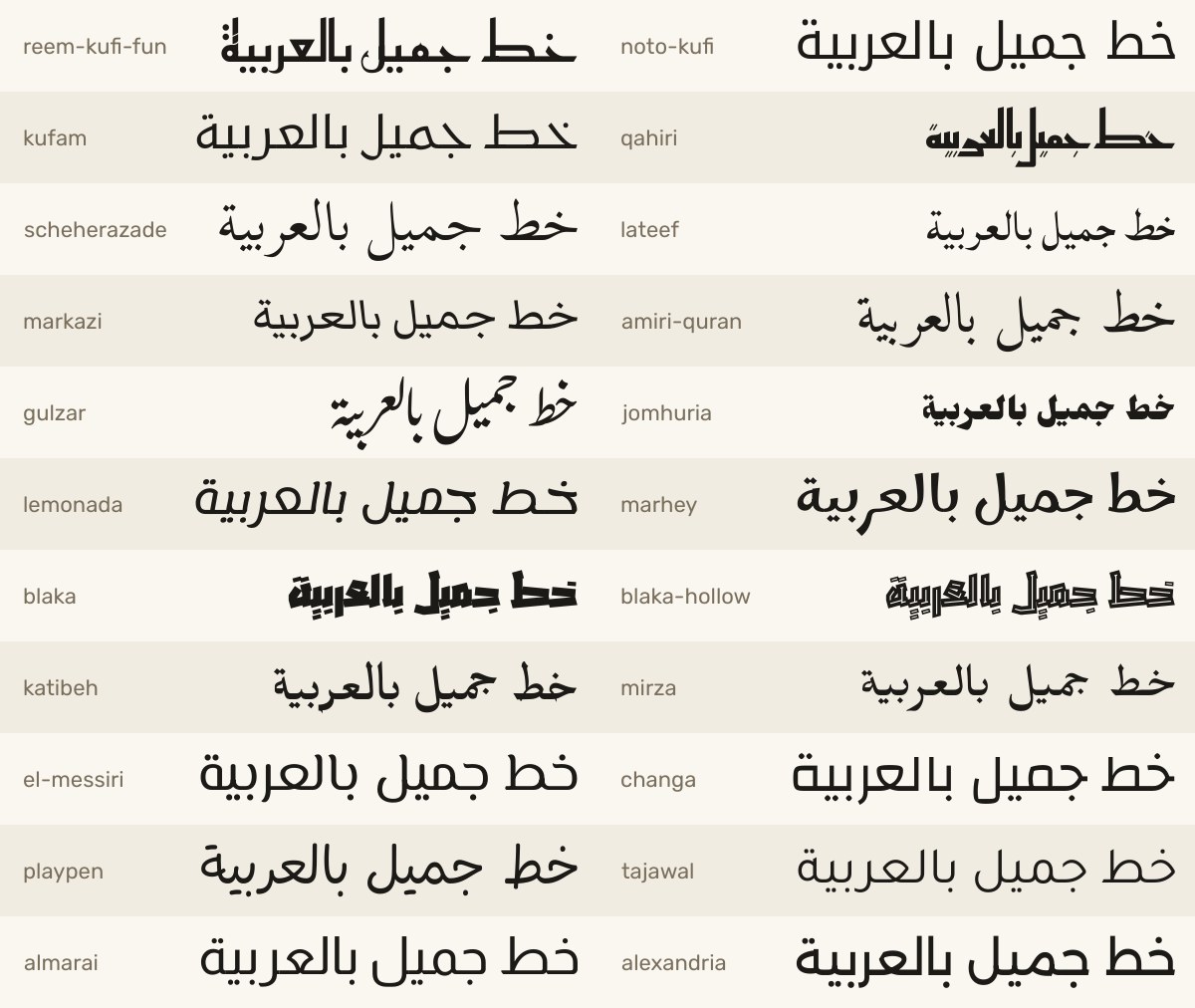
khatt.word_art("خط جميل", effect="gold", font="jomhuria").save("gold.png")
khatt.draw_text(image, (40, 40), "مرحبا", font="gulzar")
Style |
Fonts |
|---|---|
|
|
|
|
|
|
|
|
|
|
|
|
Your own fonts. Anywhere khatt takes a font (render, render_image,
draw_text, overlay, the CLI’s --font), you can pass the path to a TrueType or
OpenType file instead of a bundled name, as a string or a pathlib.Path:
khatt.draw_text(image, (40, 40), "مرحبا", font="brand/Tajawal-Bold.ttf")
khatt "مرحبا" --font ~/fonts/Tajawal-Bold.ttf
Bundled names take precedence over a file with the same name. Web fonts
(.woff/.woff2) aren’t supported, so use the font’s .ttf or .otf version. A
path that doesn’t exist raises KeyError (like an unknown name), and a file that
isn’t a usable font raises ValueError.
Glyph coverage. khatt skips characters a font has no glyph for, with a
khatt.UnsupportedCharacterWarning. khatt.missing_characters(text, font) lists
them beforehand, so you can fall back to another font:
font = "brand/Tajawal-Bold.ttf"
if khatt.missing_characters(text, font):  # e.g. ["ے", "ٹ"]
    font = "amiri"  # also covers Persian and Urdu letters
Or keep your font and name fallbacks for what it can’t draw. Every function that
takes a font also takes fallback_fonts, tried in order for each character the
font has no glyph for, such as Chinese inside an Arabic subtitle:
khatt.draw_text(image, (40, 40), "مرحبا بالعالم 中文测试",
                font="fonts/NotoSansSC-Regular.ttf", fallback_fonts=["noto-naskh"])
Arabic stays joined within its own font, and line spacing follows font.
Contributing
Bug reports, fixes and new features are welcome. See CONTRIBUTING.md for the setup and checks, and open an issue before starting on a larger change.
License
khatt is released under the MIT License. The bundled fonts are licensed
under the SIL Open Font License 1.1; see NOTICE and
khatt/fonts/LICENSES/.